Compression
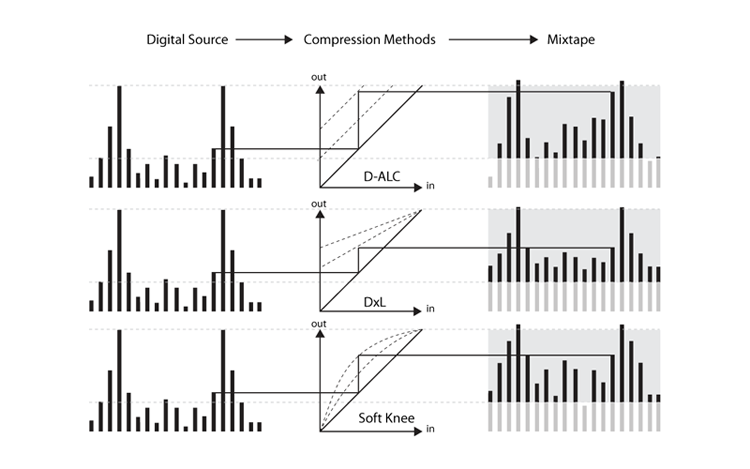
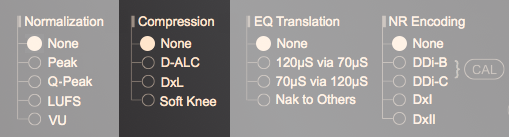
Technically, transferring digital audio to cassette is not always safe because cassette has a significantly narrower DR. Luckily, most of modern digital music releases are pre-compressed to some extent, with a considerable number of them being overly compressed during the infamous "Loudness Wars". As a result, additional DR compression is usually unnecessary in creating a digital-to-cassette mixtape. However, there are situations where DR mismatch is substantial. For example, when recording non-compressed classical music from a digital source, the loudest passages may exceed the cassette's saturation limit while the quietest passages may fall below the noise floor. In this case, using a single-side (recording-side) DR compressor can resolve this problem without having to use a complementary noise reduction system. This app offers 3 compressors designed to fix such a dynamic range mismatch with minimal distortion, each with pros and cons, as detailed below:
| Type | Pros | Cons | |
| ALC | Highly adaptive | High pumping artifact | |
| Linear dB | Good at boosting quiet passages | Sensitive to source noise | |
| Soft Knee | Good at boosting energy intensity | Limited boost on quiet passages | |
| Expander | Helpful in alleviating auditory fatigue | Can't revert original compression | |
⬤ D-ALC
This compressor is a digital version of the traditional Automatic Level Controller. When processing a highly dynamic audio content, this compressor constantly monitors the audio level and adjust the recording gain accordingly, so as to keep the peak level below the clipping threshold while also maintaining the lower level above the noise floor. Compared to the traditional analog ALC, the digital ALC here is able to foresee the input signal before it is processed, so that it can react on sharp overshoots in advance and thus reduces transient clipping distortion. This compressor doesn't operate at a constant compression ratio. But its average compression rate can be adjusted by moving the "-SNR" slider — moving to right for higher, or moving to left for lower. The downside of this type of compressor is that it may sound a little bit unnatural.
⬤ DxL
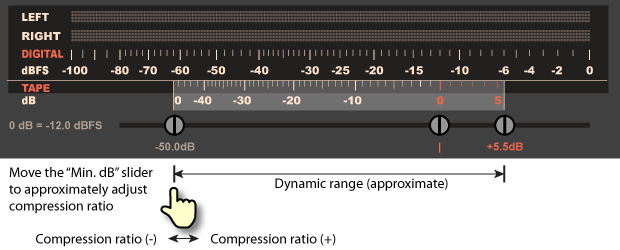
This compressor is particularly effective at boosting quieter passages up above the tape noise floor, making it suitable for recording clean but highly dynamic audio contents with many quiet passages (e.g.: classical music) onto analog tape, or creating a mixtape for listening in noisy environments such as moving cars. However, it is less suitable for processing audio materials already having significant noises. The compressor in this app is essentially a digital emulation of the analog logarithm (aka: linear decibel) compressor, commonly provided by dbx inc. (but not the complementary dbx-I/II NR). Its compression ratio can be roughly adjusted by moving the "-SNR" slider closer/farther to the "MOL" slider (refer to the pic provided at the bottom), resulting in higher/lower compression ratio. Due to its relatively longer attack time constant, this traditional compressor may allow sharp overshoots to pass through and reach the tape without warning, or exhibit a "pumping" effect when the compression ratio is set too high.
⬤ Soft Knee
This compressor reduces dynamic range by reducing the crest factor of the source audio. It applies a Bezier curve (ultra soft knee) to the original energy distribution. Such a curve can effectively boost the average energy without significantly amplifying the peaks and valleys, so that the result will sound intenser without introducing excessive artifacts. The Soft Knee compressor in this app incorporates a lookahead feature, which can analyze the input signal in advance and reacts with a negative attack time, effectively preventing transient clipping distortion caused by abrupt overshoot. Its compression ratio can be roughly adjusted by moving the "-SNR" slider closer/farther to the "MOL" slider (refer to the pic provided at the bottom), resulting in higher/lower compression ratio.
⬤ Expansion
Expansion can help make overly compressed audio sounds a bit more dynamic. For example, music mastered during the "Loudness Wars" is often so heavily compressed that leads to auditory fatigue after prolonged listening. While the damaged audio can't be restored, the listening experience can be slightly relaxed to some extent by applying a single-side (recording-side) DR expansion gently. Its expansion ratio can be roughly adjusted by moving the "-SNR" slider closer/farther to the "MOL" slider (refer to the pic provided at the bottom), resulting in lower/higher expansion ratio.
Please use it with caution, as applying too much can introduce audible artifacts.
Note 2: When using a compressor, it is recommanded to just use the "Peak" normalizer, as using a compressor will have significant impact to the accuracy of other normalizers.
Note 3: Here the term "compression" reffers to dynamic range comression, which is a totally diferent concept from the same term used for reducing audio file size, such as MP3 compression.
Note 4: Sometimes, these compressors can be applied aggressively for special purposes. For example, making a mixtape that can be enjoyed in noisy environments, such as in car or in public transit.